Prepare workspace
Working on exploiting De Rebus Antiquis can rapidely becomes a mess, I suggest you to keep your files organized as much as possible.
Later in this writeup, we will do a torough analysis of Xerub's exploit toolkit. The way files and folders are organized in that toolkit is already structured to allow working easily on multiple devices and firmwares. In that kit, there is the core tool we will use for the exploitation, called iLoader. My suggestion is to work on iLoader-related stuff within the iLoader directory and work on the other things in a separated folder. I usually create a folder for the concerned device, then inside it, a folder for each iOS versions I port the exploit to.
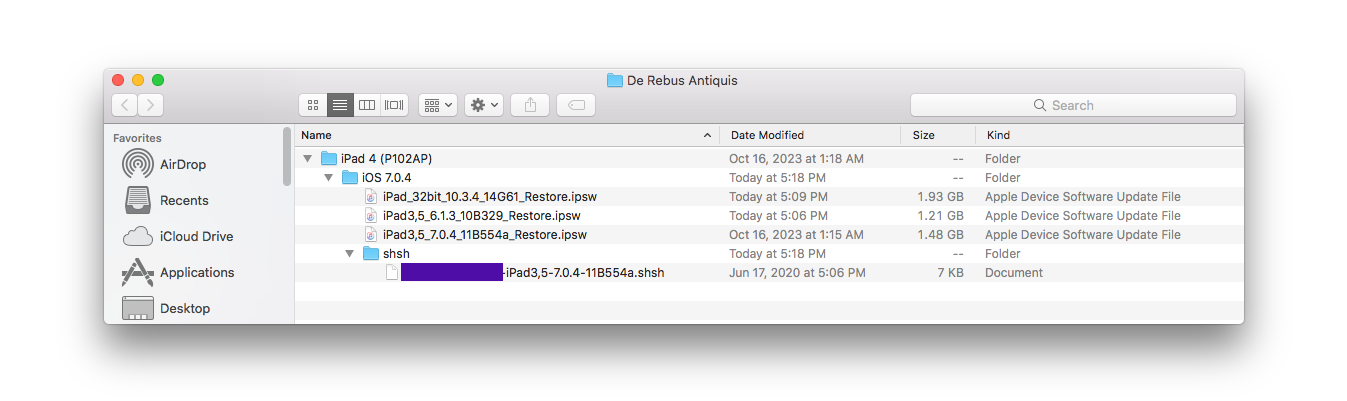
Here is an example of the directory structure I'm talking about.
- De Rebus Antiquis
- iPad 4 (P102AP)
- iOS 7.0.4
- shsh
- iloader (later)
The following files should be in the iOS 7.0.4 folder.
- A shsh folder which contains iOS 7.0.4 SHSH blobs
- iOS 7.0.4 .ipsw firmware (iPad3,5_7.0.4_11B554a_Restore.ipsw)
- Any other .ipsw firmware you plan to use for post-exploitation.
If you plan to use idevice(re)restore for the downgrade, copy your iOS 7.0.4 SHSH blobs into the shsh folder next to your idevice(re)restore executable. If you run it from the path environment variable, no need to copy or move blobs, but be sure your command prompt current directory is the iOS 7.0.4 one, so the tool can use the blobs from the shsh folder.